

Are you setting up your DigiEdu ERP software for the first time and wondering where to begin? When configuring an efficient digital admin system, the absolute starting point is your foundational institution profile.
The School Information module in the DigiEdu ERP platform acts as the official master directory for your school’s core identity—streamlining everything from official board registration codes to daily contact lines.
In this guide, we will walk you through how to easily view, manage, and keep your school profile perfectly synchronized for seamless day-to-day administration. Let’s take you through the seamless process.
How to View and Manage School Information in Your ERP Software
When setting up your school management software, verifying your core institutional records is the first crucial step. The School Information module acts as the official master directory for your institution’s primary contact and registration credentials.
In this quick walkthrough, we will look at how to check and manage these essential details directly from your DigiEdu software dashboard.
The First Step includes Selecting the School Configuration Tab on the Main Dashboard. When you click that it will lead you to the below landing page. Select the “School Information” Option as Shown.
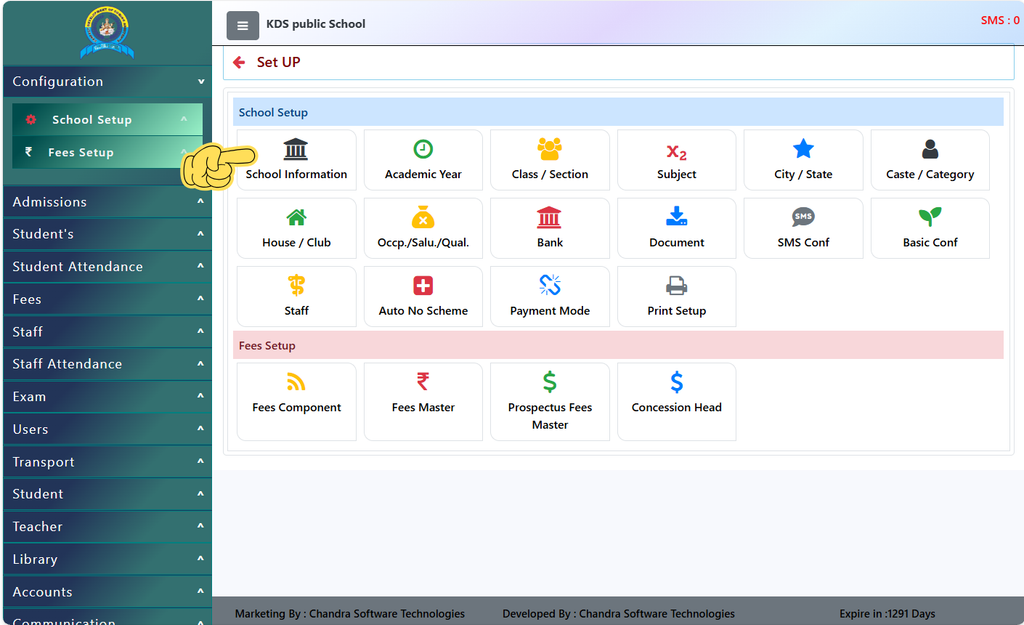
Understanding Your School Profile Data
Keeping your institutional profile up to date ensures that all official paperwork, records, and communications reflect accurate information. A standard school profile typically displays the following core fields:
(Representational Purpose Only)
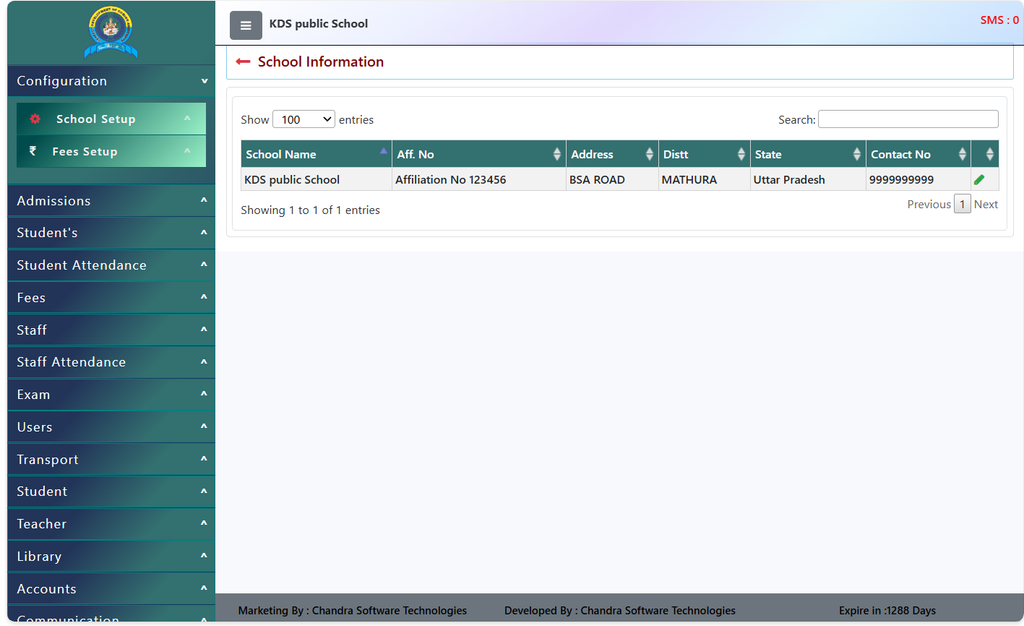
- School Name: The official registered name of the institution (e.g., KDS public School).
- Affiliation Number: Your board registration or certification code (e.g., Affiliation No 123456).
- Address & Location: The physical location details, including the street address (BSA ROAD), district (MATHURA), and state (Uttar Pradesh).
- Contact Number: The primary administrative phone number linked to the institution (9999999999).
How to Update Your School Information
What if your school gets a new address or a new contact number? If you need to make changes or correct any entry in your master profile, the process is straightforward:
- Navigate to the Module: Log in to your ERP dashboard, expand the School Setup menu, and click on School Information.
- Locate the Edit Option: On the data table displaying your school record, look at the rightmost column.
- Edit Details: Click on the Green Edit Icon (Pencil symbol) located next to your school’s contact details to open the modification form, update your information, and save the changes.
And Yes! You’ve just Completed the First Milestone ! Adding your school to the most seamless ERP – DigiEdu
Why DigiEdu School ERP is the Right Choice for Your Institution
See it was that simple! Registering your school in our portal is no less than a cakewalk.
Utilizing the School Information module in the Chandra Software Technologies ERP platform brings seamless efficiency and accuracy to your daily administrative workflow.
By centralizing your core institutional data—such as official names, locations, and contact details—the system eliminates repetitive manual entry and human errors. It ensures that every generated fee receipt, report card, and official document consistently reflects authentic branding.
Ultimately, this robust digital foundation saves valuable time for school staff, allowing them to focus more on student growth and quality education rather than cumbersome paperwork.
Managing institutional data accurately is the cornerstone of successful school administration. With the School Information module powered by DigiEdu, schools get a seamless, centralized platform to control their core identity, branding, and official documentation effortlessly.
And If you face any concerns !! Remember we are always there to help you out !
Contact Chandra Software Technologies
Now that you know its that simple!! Get in touch with Chandra Software Technologies to discuss your requirements and explore the right digital solution for your organization.
Address:
2A/638, Krishna Vihar, BSA Engineering College Rd, Mathura, Uttar Pradesh 281001
Sales:
+91 821 848 8224
info@cstmtr.com
Support:
+91 821 848 8224
support@cstmtr.com