

A fee concession is a discount or reduction in school fees. Schools give these discounts to help families pay less for things like books or monthly tuition. In DigiEdu ERP, the Concession Head helps teachers and admin staff manage these discounts easily.
How to Use It Step-by-Step
Using the concession page is very simple. Follow these steps:
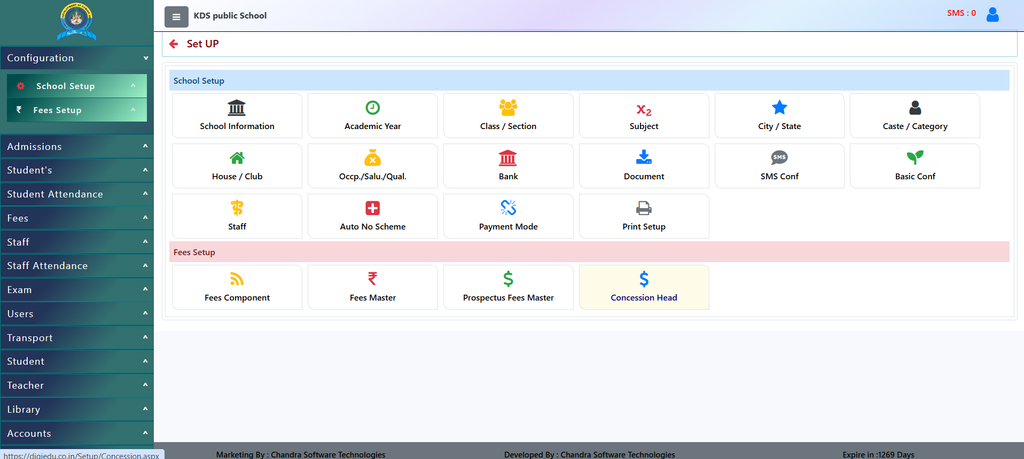
- Go to the Concession Page: Open the DigiEdu Dashboard and click on the School Configuration module and open concession head feature.
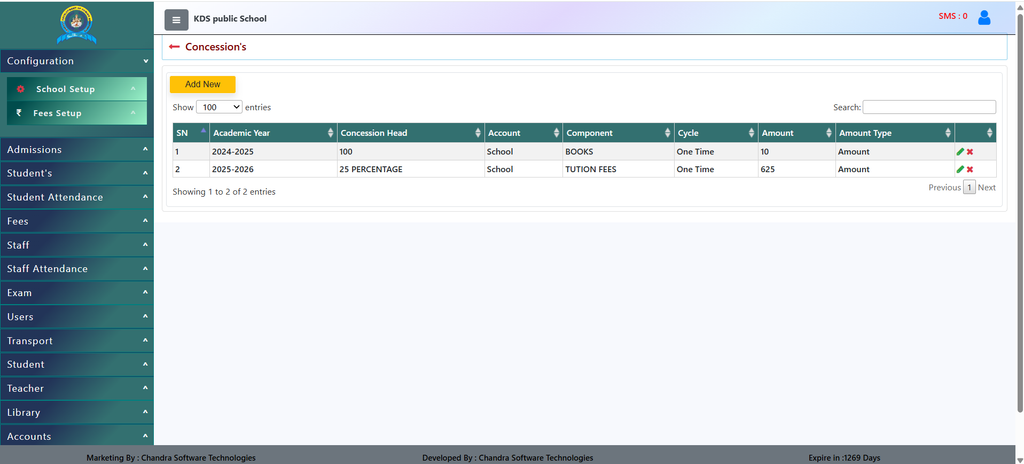
- Add a New Concession: Click the yellow [Add New] button at the top.
- Fill in the Details:
- Academic Year: Choose the year (for example, 2025-2026).
- Concession Head: Type the name or rule of the discount.
- Component: Choose what the discount is for, like BOOKS or TUTION FEES.
- Amount: Type how much money or percentage will be reduced.
- Save Your Work: Click save, and the discount will be added to the list. You can also edit or delete old entries using the icons on the right side.
Why Should You Use It?
- Saves Time: You do not need to calculate discounts by hand every time. The system remembers them for you.
- Keeps Good Records: It shows a clear list of all discounts given, such as a discount on BOOKS or TUTION FEES.
- Fair and Clear: Everyone can see which student or category gets a discount, stopping any confusion.
Contact Chandra Software Technologies
Looking for a technology partner for your business? Get in touch with Chandra Software Technologies to discuss your requirements and explore the right digital solution for your organization.
Address:
2A/638, Krishna Vihar, BSA Engineering College Rd, Mathura, Uttar Pradesh 281001
Sales:
+91 821 848 8224
info@cstmtr.com
Support:
+91 821 848 8224
support@cstmtr.com