

In DigiEdu ERP Prospectus Fees Master is where you set the price for your school’s prospectus or registration forms for new admissions. When parents or students come in to buy a prospectus, the system uses this amount to keep track of the payment.
How to Use It
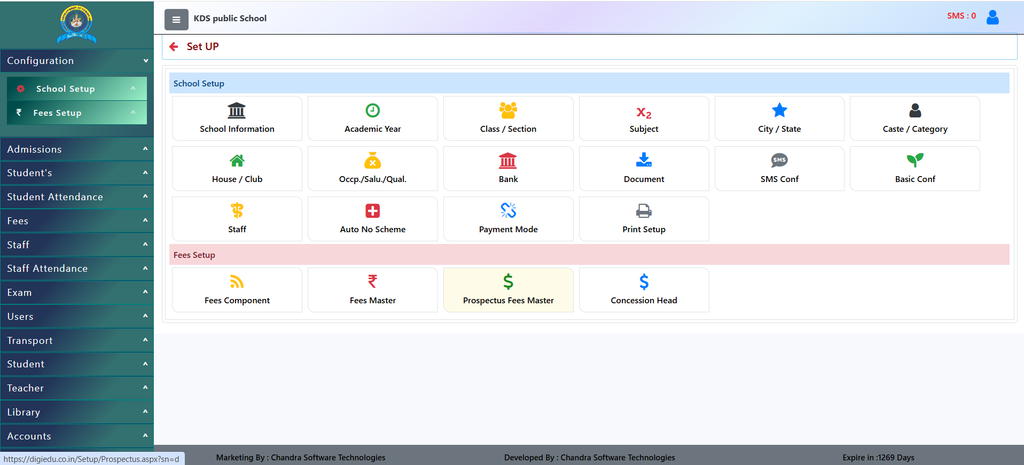
- Login to Your DigiEdu ERP dashboard Go to School Configuration and click at prospectus fees master.
- Click the Add New Button Select the current academic session and class.
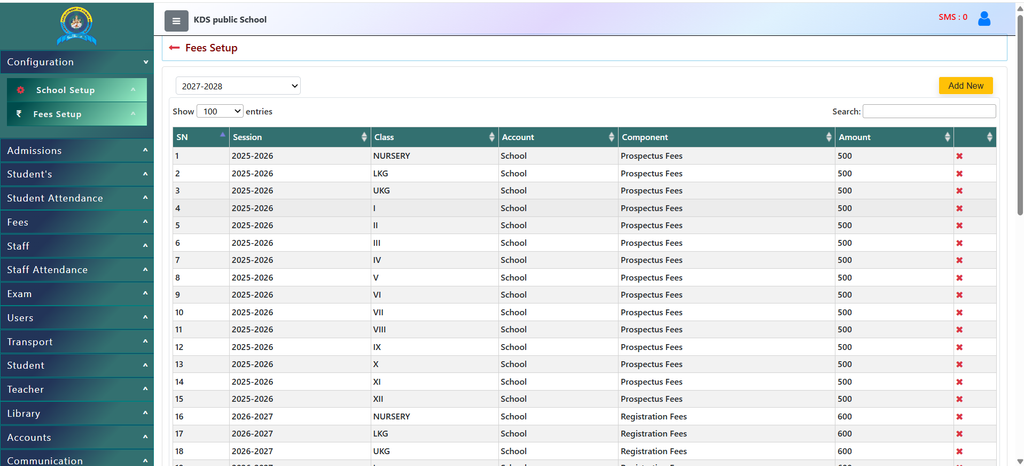
- Enter the set fee amount (for example, ₹500 or ₹1000) and all other things asked as per your preference.
- Click Save, and it is instantly updated for all new admissions!
Why Use It?
- Fixed Pricing: Ensures everyone in the office charges the exact same, correct amount for the prospectus.
- Quick Admissions: Speeds up the admission process because the form fee is already saved in the software.
- Clear Financial Records: Helps the accounts team keep track of how many prospectuses were sold and how much money was collected.
Contact Chandra Software Technologies
Looking for a technology partner for your business? Get in touch with Chandra Software Technologies to discuss your requirements and explore the right digital solution for your organization.
Address:
2A/638, Krishna Vihar, BSA Engineering College Rd, Mathura, Uttar Pradesh 281001
Sales:
+91 821 848 8224
info@cstmtr.com
Support:
+91 821 848 8224
support@cstmtr.com