

The Payment Mode Master in DigiEdu ERP is a simple settings page in a school management system. It allows schools to create, view, and manage all the different ways parents can pay school fees, such as Cash, UPI, Bank Transfer, or Cheque.
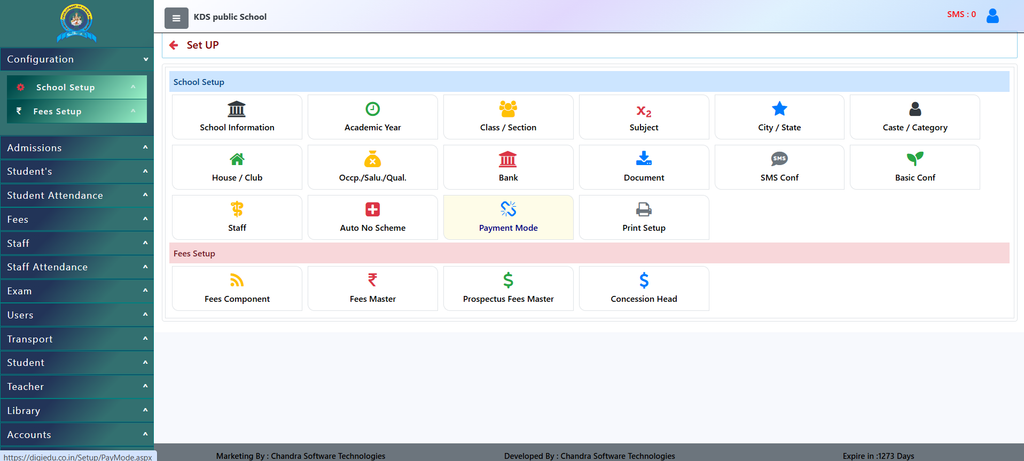
How to Use It
- Login to your DigiEdu ERP dashboard and open the School Configuration Module.
- Look for the Payment Mode Master section.
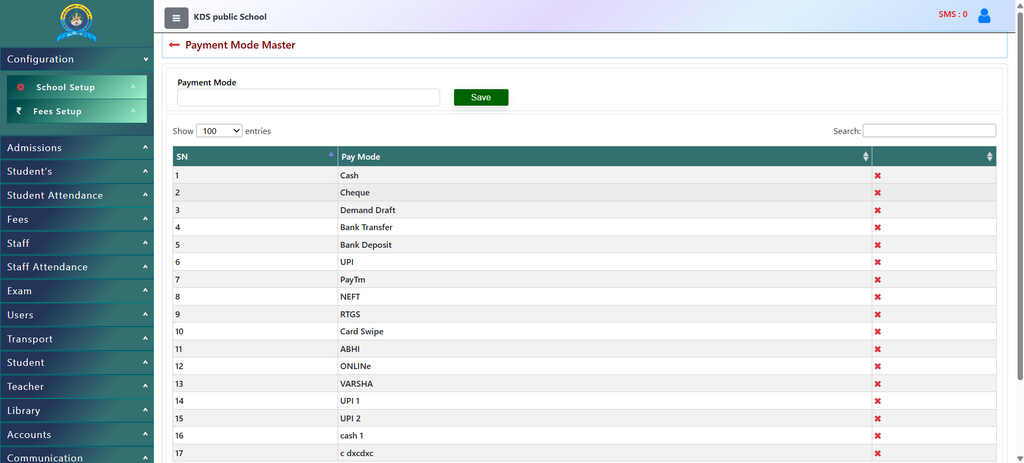
- Type the name of the payment type (for example, UPI or Bank Transfer) in the text box.
- Click the Save button to add it to the active list.
- View or delete modes easily from the list on your screen whenever needed using the cross symbol visible.
Why Use It?
- No Manual Entry Each Time: Whenever you enter any details you can directly select the payment mode rather then entering it manually again and again.
- Easy Tracking: Schools can neatly track money coming in through different channels.
- Organized Accounts: It keeps all financial records clean and stops confusion during fee collection.
Contact Chandra Software Technologies
Looking for a technology partner for your business? Get in touch with Chandra Software Technologies to discuss your requirements and explore the right digital solution for your organization.
Address:
2A/638, Krishna Vihar, BSA Engineering College Rd, Mathura, Uttar Pradesh 281001
Sales:
+91 821 848 8224
info@cstmtr.com
Support:
+91 821 848 8224
support@cstmtr.com